Inviting a team member and accepting a team invite
Invite someone to help manage your landlord account, choose whether they should be an administrator, and understand what happens while their invitation is pending.
Before you begin
- You must be an administrator of the landlord account to send a team invitation.
- Have the invitee’s first name and email address ready.
Steps
Step 1
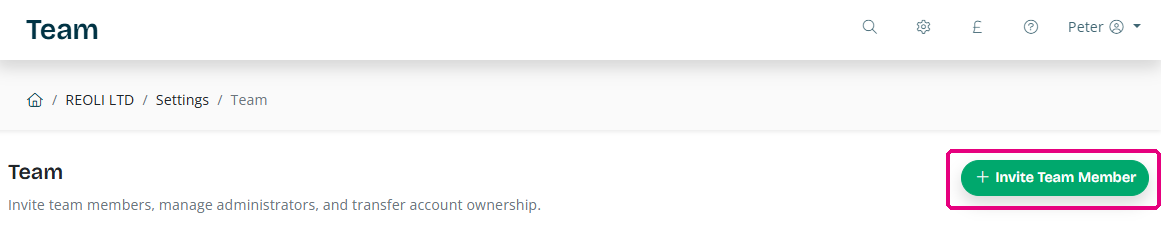
Open the landlord’s Settings > Team page and select Invite Team Member. This opens the form for inviting someone to the landlord account.
Step 2
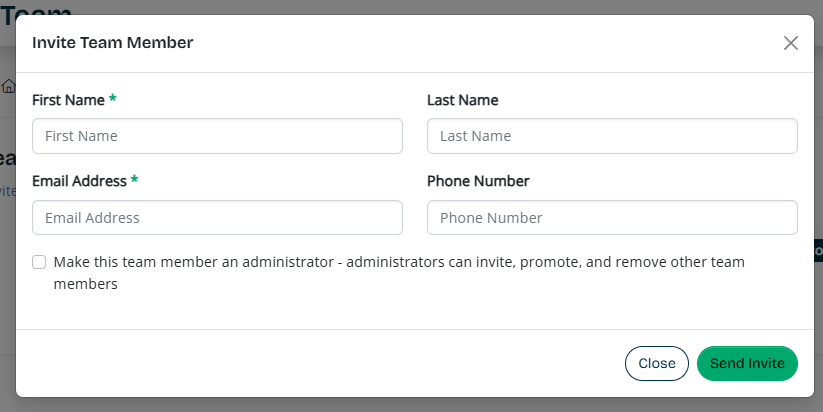
Fill in the invitee’s details. Check the email address carefully: the invitation is sent there, and the address is used to match the invite later.
- Enter their First Name; this field is required.
- Enter their Email Address; this field is required.
- Enter their Last Name if you have it.
- Enter their Phone Number if you have it.
Things to consider: An email address cannot be invited twice to the same landlord account: an existing team member or a pending invite with that address will prevent a new invitation.
Step 3
To give the invitee administrator status, tick Make this team member an administrator - administrators can invite, promote, and remove other team members. Administrators can also demote team members; leave the checkbox unticked if the invitee should not have those team-management powers.
Step 4
Select Send Invite. The person appears in the team list immediately with Invite Pending status; this means they have been invited, not that they have joined the team. The email includes a View Invitation link for them to view and accept the invitation.
Good to know: The invitation link is valid for seven days.
Troubleshooting
- If you see “Invite not emailed”, the invite was created but the email was not sent. Remove the person from the team and invite them again; contact support if it keeps happening.
- If an invitation is rejected because the email address is already on this landlord’s team, check for both an existing member and a pending invite before trying again.
What you’ll have done
The invitee appears in the team list as Invite Pending until they respond. They can use the link in the invitation email to view and accept it.
FAQs
Can I change the email address on a pending invite?
No. Remove the pending invite and send a new one to the correct address.
Does Invite Pending mean the person has joined the team?
No. Invite Pending means an invitation has been sent but has not yet been accepted.
Can an invitation be accepted using a Reoli account with a different login email address?
Yes. The invited address remains the contact address for that landlord account.
Not using Reoli yet? Everything in this guide is part of Reoli’s property management software for UK landlords.