Recording a gas safety certificate
The Gas Safety section tells you what Reoli has on record, checked against the rules it holds for this nation. Not legal advice. Reoli reads the property details and records you enter to work out whether a check applies and when the next one is due. It does not arrange checks, contact engineers or send records to tenants.
Before you begin
- The property is in Reoli. A landlord or team member who has accepted their invite can answer the gas appliance question and upload the record.
- Have the gas safety record and the date of its check ready. A photo of a paper record is fine.
Steps
Step 1
Open Properties from the side menu, select the property and open its Overview tab.
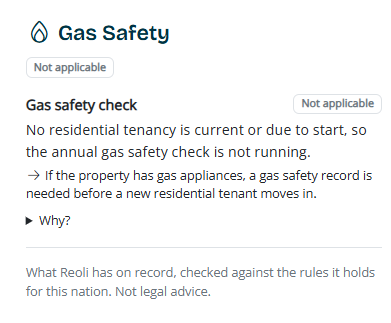
- Find the Gas Safety section beside the property details.
- The check applies when the property has a gas appliance you provide and a residential tenancy is current or due to start.
Step 2
If asked whether you provide a gas appliance at the property, select Yes or No.
- Count a boiler, cooker or fire you provide on mains gas or LPG. An appliance the tenant owns does not count.
- Reoli confirms, “Reoli has recorded your answer and updated the gas safety check.” The section updates straight away.
- You can change the answer later in Edit Property, under Gas Appliance.
Good to know: Not sure? Leave it for now. Reoli shows the check as Unknown until you answer.
Things to consider:
- No is not the same as an unanswered question. Select it only if there is no gas appliance you provide; update the property if you install one later.
- To leave the question unanswered again, choose (Not recorded) under Gas Appliance in Edit Property.
Step 3
If a record is needed, select Go to Documents or open the property’s Documents tab.
- Select + Document to upload the record to the property.
Things to consider: Upload it to the property, not a unit or tenancy. Reoli only reads gas safety records attached to the property.
Step 4
In Upload Document, choose the File and set Document Type to Gas Safety Certificate.
- Enter the check date in Document Date.
- If useful, enter a Reference, such as “Gas Certificate 2026”, and the record’s Expiry Date.
- Select Upload.
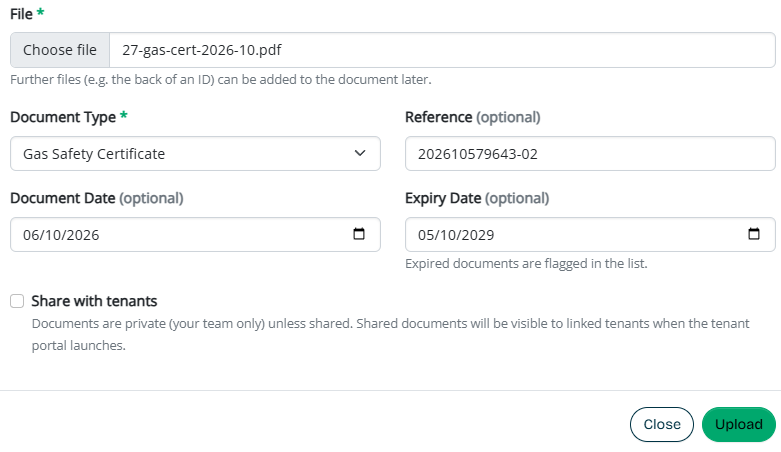
Good to know: Document Date is marked optional, but without the check date the status stays Unknown: Reoli cannot work out when the next check is due.
Things to consider: You can upload a PDF, JPEG, PNG, GIF, WebP, Word or Excel file. Reference accepts up to 100 characters.
Warning: Share with tenants does not send the record. It only marks it as visible to linked tenants when the tenant portal launches; you still need to give the tenant a copy yourself.
Step 5
Return to Overview and review the Gas Safety result.
- When the check applies and the record has a check date, review its Date of check, Next check due and status.
- Recorded: a record is on file and the next check is not yet due. It is not a badge certifying that the property is safe.
- Action required: the check applies, but there is no record, the next check is overdue, or the record’s expiry date has passed.
- Unknown: Reoli needs more information, such as the gas appliance answer, check date, property’s nation or current tenancy’s type.
- Not applicable: the check does not apply right now because there is no gas appliance you provide, no current or upcoming residential tenancy, or only a commercial lease.
Good to know:
- When the status is Unknown, the “To check this, Reoli needs:” box lists what is missing and provides Yes and No, Go to Documents, Go to Tenancies or Edit Property as appropriate.
- If a residential tenancy is due to start and no record is on file, Reoli gives its start date as the deadline. The new tenant needs a copy before they move in.
Things to consider:
- Reoli uses a 12-month interval in England, Wales, Scotland and Northern Ireland. Select Why? to read the rule and its source.
- For a check made up to two months early in England, Wales or Scotland, Why? explains why the next check may be due later than Reoli shows.
Step 6
After each annual check, upload the new record to the property in the same way.
- Reoli uses the record with the latest Document Date, or the latest upload if no date was entered, and marks older records Replaced.
- Check the resulting next-due date on Overview.
Good to know:
- The next check is due 12 months after the check date. If an Expiry Date is entered and falls earlier, Reoli uses that date instead.
- Archiving the newest record makes the previous record current again.
Troubleshooting
- If the status is Unknown, use the “To check this, Reoli needs:” box to fill in the missing information. For a missing tenancy type, select Go to Tenancies; see our tenancy guide for help with tenancy details.
- If the Gas Safety section does not load, reload the property page.
- If an old record becomes current again, check whether the newest record was archived.
What you’ll have done
The property has an accurate gas appliance answer and, where a check applies, its latest gas safety record is attached to the property with the check date entered. Gas Safety reflects what Reoli has on record, not a guarantee of compliance. The landlord dashboard summarises gas safety across properties, lists properties needing action or a check, and includes checks due soon in upcoming items. For other property compliance, use the property’s Licences tab for applicable licences and Documents tab for documents flagged with expiry dates; see our licence and document guides.
FAQs
Does uploading the certificate send it to my tenant?
No. Share with tenants does not send a copy. It marks the document as visible to linked tenants when the tenant portal launches; you must give the tenant a copy yourself.
Why is the status Unknown when I have uploaded a file?
Reoli needs a check date to calculate the next due date. Enter it as Document Date on a record attached to the property. The Gas Safety section also identifies other missing information.
Can I record that the property has no gas appliance?
Yes. Select No if there is no gas appliance you provide. This is a recorded answer, unlike leaving the question unanswered; update it if you install an appliance later.
Which record counts if I have uploaded more than one?
Reoli uses the record with the latest Document Date, or the latest upload if no date was entered. It marks older records Replaced. Archiving the newest makes the previous record current again.
Not using Reoli yet? It keeps certificates and licences with each property, and its weekly digest flags anything expiring.