Tenancy compliance: recording deposit protection
Record the deposit amount, when it was paid and its protection details, then use Deposit Check to review what Reoli has on record, checked against the rules it holds for this nation. The check explains what needs attention; it does not protect the deposit or guarantee that it meets the law.
Before you begin
- Open the tenancy for which you took the deposit.
- Have the deposit amount and payment date ready. If the deposit has been protected, have the scheme details and certificate to hand.
Steps
Step 1
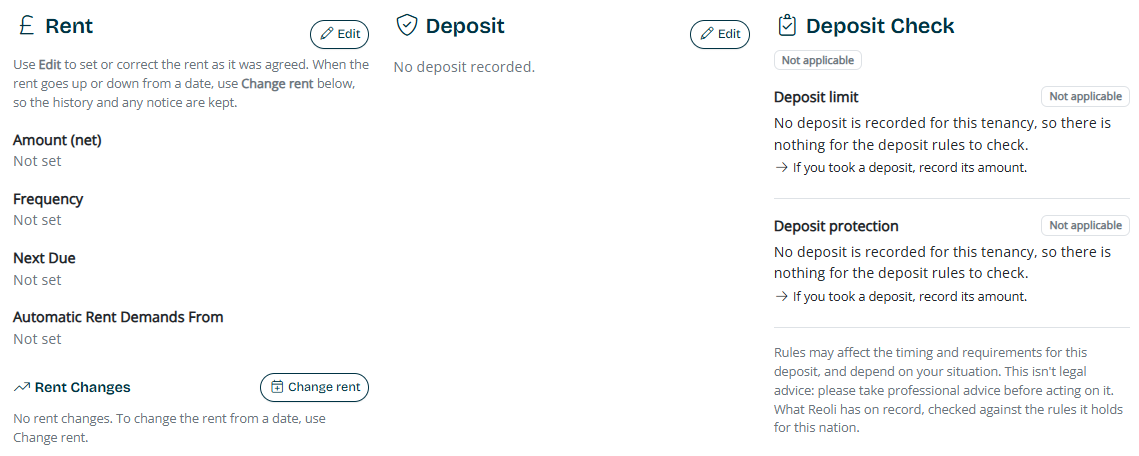
Select Tenancies from the side menu, open the tenancy and select Rent & Deposit. The Deposit section holds the details you enter; Deposit Check gives separate results for the deposit limit and deposit protection.
Step 2
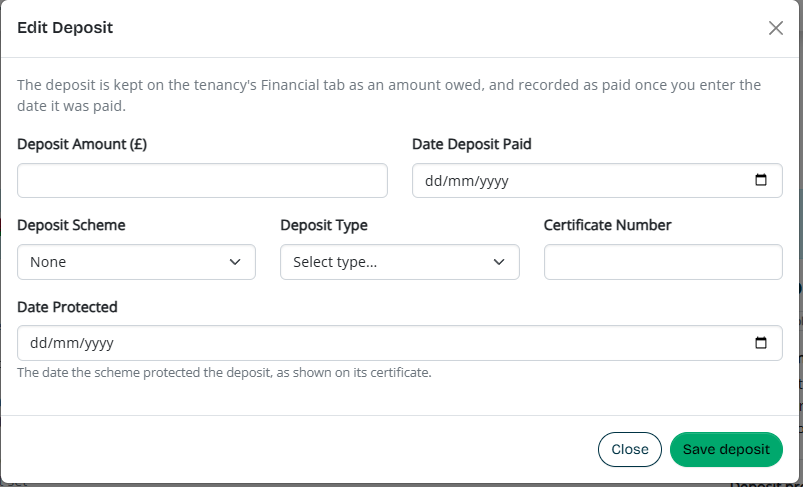
In the Deposit section, select Edit to open Edit Deposit. Enter the amount and payment date, then add the protection details once you have them and select Save deposit.
- Enter the amount taken in Deposit Amount (£) and the date you received it in Date Deposit Paid.
- Choose the Deposit Scheme and Deposit Type, then enter the Certificate Number and Date Protected. The protection date is the date shown on the scheme’s certificate.
- The Deposit Scheme list contains approved schemes available for the tenancy’s nation. Deposit Type offers Custodial, Insured and Other.
Good to know: Record Date Deposit Paid even if you will add protection details later: without that date or a tenancy start date, Reoli cannot work out the protection deadline and the result stays Unknown.
Step 3
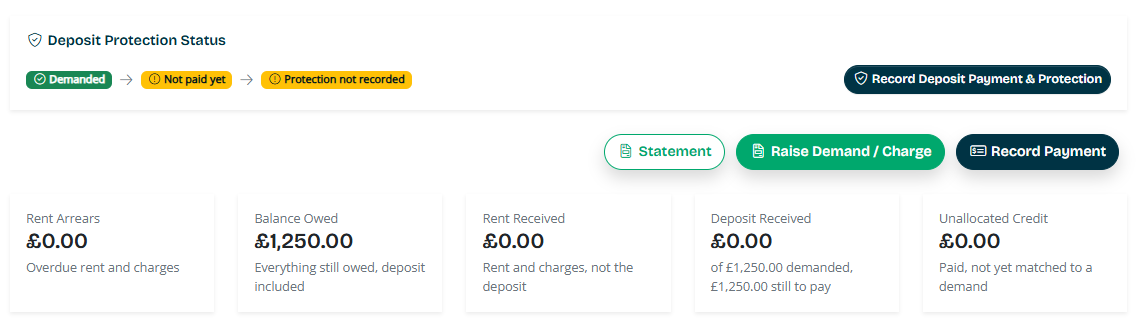
Select Financial to see the deposit on the tenancy statement as an amount owed. If you entered a Date Deposit Paid of today or earlier, Reoli also records payment of the full amount on that date; a future date sets when it is due instead. The Deposit Protection Status strip tracks Demanded, Paid and Protection recorded.
Good to know: If you did not enter Date Deposit Paid, the amount owed is due on the tenancy start date.
Things to consider: While no payment has been recorded against the deposit, changing its amount on the tenancy replaces the amount owed, and removing the amount voids it. Once a payment has been recorded, correct the Financial tab entries instead; later changes to the tenancy’s deposit amount do not change them.
Step 4
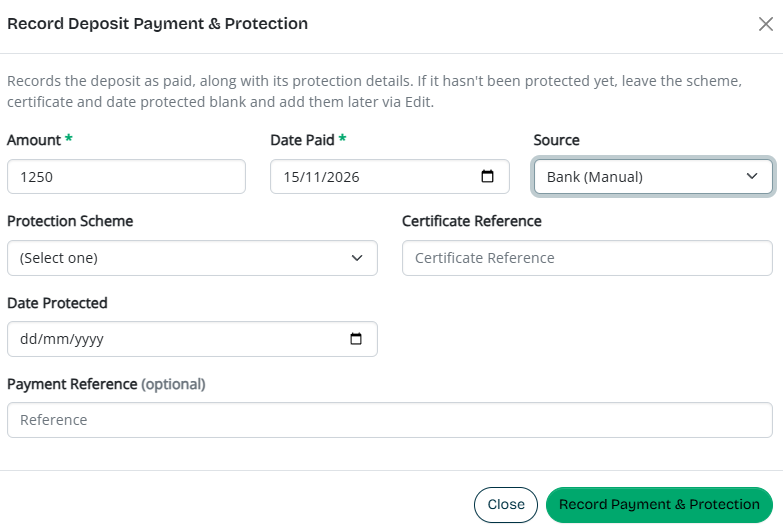
Alternatively, if the deposit has arrived but is not yet recorded as paid, select Record Deposit Payment & Protection in the Deposit Protection Status strip. Complete the guided window and select Record Payment & Protection; the Date Paid you enter also fills in Date Deposit Paid on the tenancy.
- Enter the payment Amount and Date Paid, and choose its Source. You can also enter a Payment Reference (optional).
- If protection is already in place, choose the Protection Scheme and enter the Certificate Reference and Date Protected.
- If the deposit has not been protected yet, leave the protection scheme, certificate and date blank. Add them later through Edit in the Deposit section.
Good to know: The Record Deposit Payment & Protection button remains available until the deposit is both paid and has protection recorded.
Step 5
Return to Rent & Deposit and review both results in Deposit Check. Each result has a Why? control that explains the rule applied, when it came into force and the working behind the result.
- Deposit limit compares the amount recorded with the Maximum deposit calculated from the rent and its frequency. If the amount is above the maximum, the result shows the deposit, maximum and difference, asks you to check the amount, and says the excess may have to be repaid.
- Deposit protection shows whether both a scheme and certificate number are recorded, alongside the Protection deadline. Reoli works out that deadline from the deposit payment date or tenancy start date, whichever the nation’s rule uses, and the rule in force on that date; rules measured in working days skip weekends and bank holidays.
- Recorded means the details Reoli expects are on file: the amount is within the applicable maximum, or both a scheme and certificate number are recorded. It is not a compliance guarantee. With both protection details but no Date Protected, protection remains Recorded and lists the missing date with an Edit Deposit button.
- Action required means the deposit exceeds the maximum or protection has not been recorded, before or after the deadline. A scheme without a certificate number, or a certificate number without a scheme, does not count as protection recorded. If Date Protected is after the deadline, the result asks you to check that date with the scheme.
- Unknown means Reoli lacks a detail needed to decide, such as the payment date, tenancy start date, rent or property’s nation. The To check this, Reoli needs: box lists what is missing and offers Edit Deposit, Edit Rent or Edit Tenancy where you can add it.
- Not applicable means there is no deposit recorded, no maximum deposit applies for this tenancy’s nation, or the tenancy is a commercial lease. If no amount is recorded, or it is £0, the check says: “If you took a deposit, record its amount.”
Things to consider:
- Things to note: Reoli does not offer legal advice. Deposit Check reflects what is recorded and is not a substitute for checking that the deposit meets the law.
- Recording a scheme and certificate number in Reoli does not protect the deposit. You must arrange protection with the scheme; Reoli does not contact the scheme or check the certificate or protection date with it.
- Reoli does not send the tenant the scheme’s prescribed information.
- The landlord dashboard summarises deposits for current and upcoming tenancies and links tenancies needing action or details to Rent & Deposit. The Deposits & Protection report under Reports lists deposit demands across tenancies and flags those paid without protection recorded.
Troubleshooting
- If Deposit Check is Unknown, use its To check this, Reoli needs: box to find the missing detail and the relevant edit button.
- If protection still shows Action required after you enter a scheme, check that you also entered the certificate number.
- If a deposit payment is already recorded and the Financial tab needs correcting, use the relevant Void or Reverse action there rather than changing the tenancy amount.
What you’ll have done
The tenancy holds the deposit amount, payment date and any protection details you recorded. Its Financial tab tracks the amount owed and any payment, while Deposit Check displays separate, explained results for the limit and protection.
FAQs
Can I enter the deposit before it has been protected?
Yes. Record the amount and payment date now, then add the scheme, certificate number and protection date through Edit once protection is in place.
Can I enter deposit details when I create the tenancy?
Yes. You can enter the deposit amount when creating the tenancy or add and correct it later. See Creating a tenancy and Editing a tenancy and linking additional tenants to it.
Can another member of my team record the details?
Yes. Any member of your landlord team who has accepted their invite can record deposit details.
Does Protection recorded mean Reoli has checked the deposit with the scheme?
No. It means a scheme and certificate number are recorded in Reoli; Reoli does not verify them with the scheme.
Not using Reoli yet? It records each deposit and its protection deadline for the nation, and flags any deposit not protected.