Transferring landlord account ownership
Transfer ownership of your landlord account to a team member who has accepted their invitation. They become the owner and an administrator; you remain on the team as an administrator.
Before you begin
- You are the current account owner.
- The person receiving ownership has accepted their team invitation.
Steps
Step 1
On the Team page under Landlord Settings, find the person who should become the new owner.
- Check their name and email address so you choose the right person.
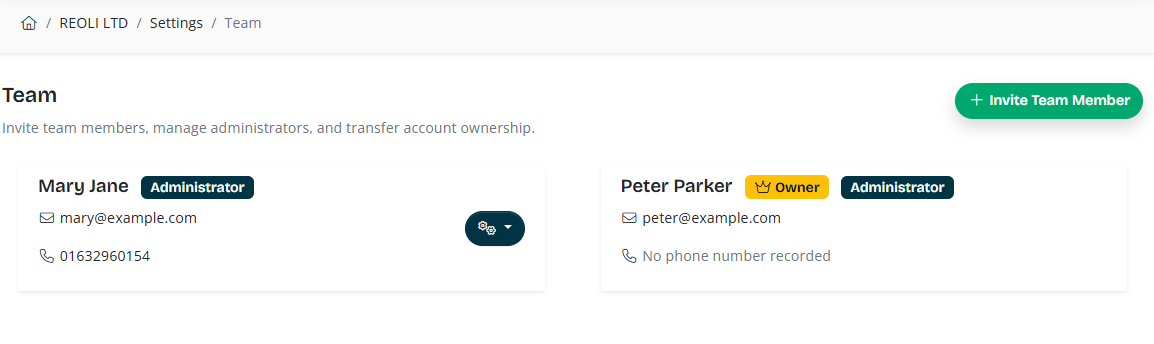
Good to know: A member marked Invite Pending cannot receive ownership. They must accept their invitation first.
Step 2
Open the cog-shaped actions button on their row and select Transfer Ownership.
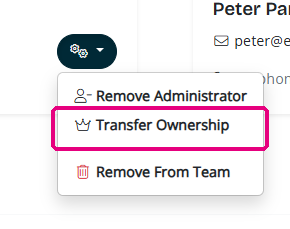
Good to know: Only the current owner has this option. Other administrators do not see it.
Step 3
Read the confirmation message, then select Transfer Ownership to confirm.
- Check that the message names the person you intend to make owner.
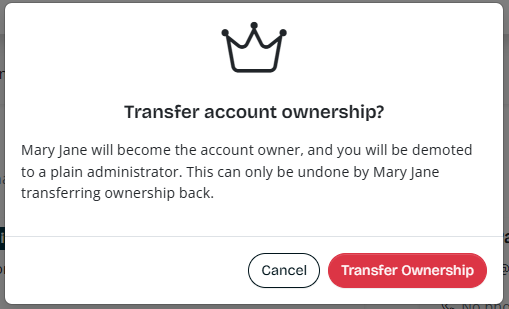
Warning: Once you transfer ownership, only the new owner can transfer it back to you.
Step 4
Check the refreshed team list to confirm the new owner has the Owner badge.
- Your own entry remains in the list as an administrator.
- The new owner is also an administrator, even if they were not one before.
- The new owner’s row has no actions menu because an owner cannot be demoted or removed.
Good to know: As an administrator, you can still invite, promote, demote and remove other team members.
Things to consider: An owner cannot be removed from the team or have their administrator status taken away. Transfer ownership first if you intend to step back or leave.
Troubleshooting
- If Transfer Ownership is missing, check that you are the current owner and that the intended recipient is not marked Invite Pending.
What you’ll have done
The recipient becomes the account’s sole owner and an administrator. You remain a team administrator, but only the new owner can transfer ownership again.
FAQs
Do I need to make the recipient an administrator first?
No. Transferring ownership makes them an administrator automatically.
Can I transfer ownership to someone whose invitation is pending?
No. They must accept their invitation before they can receive ownership.
Can I transfer ownership back to myself afterwards?
No. Only the new owner can transfer it back to you.
Will transferring ownership remove me from the team?
No. You remain on the team as an administrator.
Not using Reoli yet? Everything in this guide is part of Reoli’s property management software for UK landlords.